

Alarming Behavior Tracking
Get Notifications of Visitor Frustrations
Introducing Alarming Behavior Events
Identify and Remove UX Issues Before They Hit Your Bottom Line
Alarming behavior tracking enables you to uncover visitor frustrations in real time. By identifying signs of poor experiences like rage clicks, dead clicks, and rapid reloads, you gain the insights needed to create a smoother, more enjoyable journey for everyone.
With TWIPLA, you don’t just observe alarming behavior - you’re empowered to understand and address it effectively. From dynamic event tracking to curated replays, everything works as one to ensure you stay ahead of the problems that can lead to lost conversions.
Why Alarming Behavior Events?
- Identify critical customer challenges that impact your UX.
- Prioritize actions using the intuitive Website Usability Score.
- Track trends and detect issues across all devices effortlessly.
- Resolve UX problems quickly with actionable, real-time data.
Alarming Behavior Analysis with Event Tracking
Track Frustrations with Precision
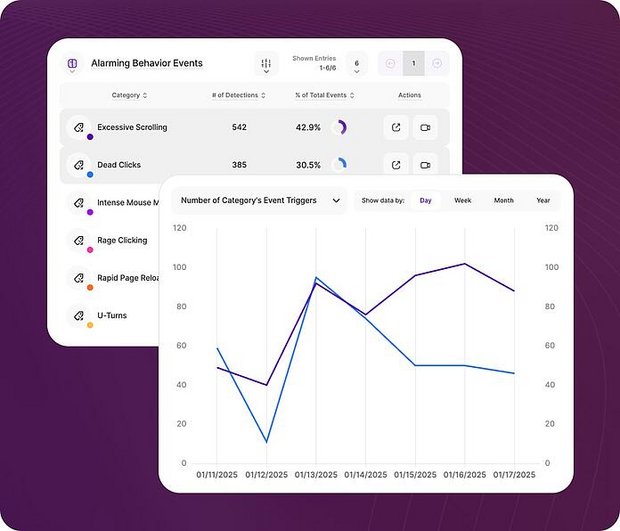
Event Tracking's Alarming Behavior Events module provides real-time insights into key behavioral signals affecting your website's UX.
Dynamic graphs showcase the frequency of these events over time, helping you identify patterns and problem areas across devices. Analyze individual event types for detailed insights or compare multiple categories to uncover broader trends and correlations.
Categorized data makes it easy to prioritize and address the issuesthat matter most to your visitors, allowing you to take targeted action that improves usability and prevents lost conversions.
Event Tracking transforms complex behavior patterns into understandable data, empowering you to optimize your website and provide a smoother visitor experience.
Alarming Behavior Analysis with Session Recordings
Watch Curated Lists of Replays
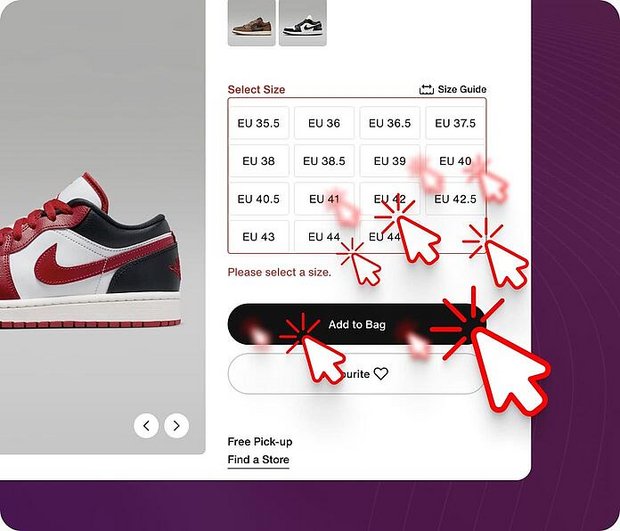
Session Recordings is connected to the Alarming Behavior Events functionality, meaning that you can dive straight into videos of the journeys that matter most. From the Event Tracking interface, access curated lists of replays tied to common pain points.
When viewing recordings, timestamps automatically mark alarming events, allowing you to jump directly to key moments of interest.
The intuitive playback interface also features a detailed pop-up window, providing a snapshot of critical behaviors within the session, including event counts, visitor attributes, and device details.
With these tools, you’re not just watching videos - you’re getting meaningful insights. See exactly when and where visitors encounter problems, understand why pain points occur, and make informed changes to improve UX and motivate engagement.
Alarming Behavior Analysis with Dashboards
Intuitive Website Usability Score
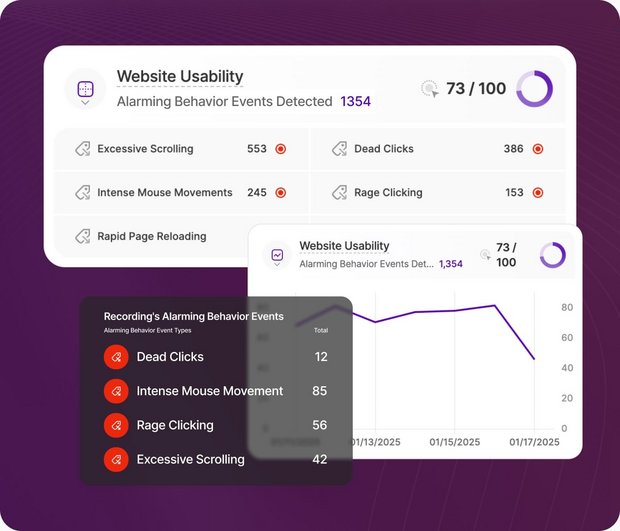
The Website Usability Score in TWIPLA’s Master Dashboard provides an at-a-glance assessment of your site’s overall health, helping you prioritize and take action where it matters most.
Dynamic graphs and data tables showcase trends in site irritations like dead clicks and excessive scrolling. Dive deeper by selecting specific event categories to access detailed insights, including session counts, timestamps, and referring URLs. Analyze individual pages or compare multiple pages side by side using interactive graph visualizers.
This intuitive feature empowers you to resolve usability issues quickly, protect conversions, and deliver a smoother visitor experience - all guided by real-time data.